Expedition Mode is the system that gives Anime Expeditions its name. Instead of entering a familiar Story lane and following one fixed upgrade script, your group moves a payload through a generated network of combat nodes, makes temporary Anvil choices at checkpoints and brings the proceeds back to persistent buildings. The best first goal is not the highest difficulty. It is a repeatable clear that teaches which resource, route and upgrade choice actually survives to the boss.
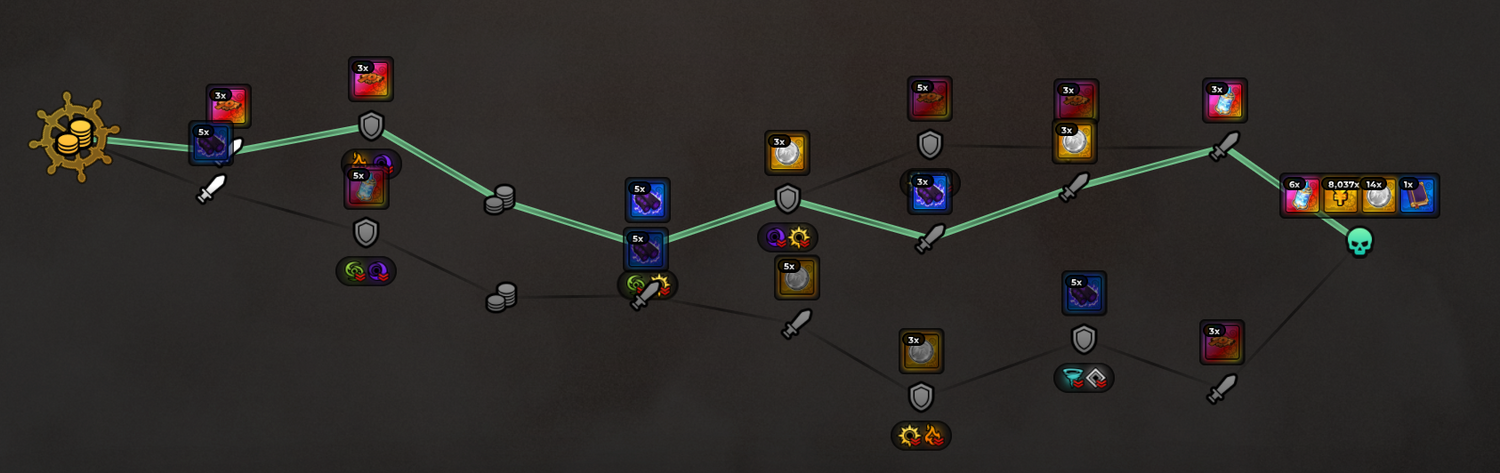
Read the current node labels in your run; the route can change between attempts.
Interactive Expedition map and node selector
Select a documented map to see its unique material, then select a node type to decide whether the route is worth the Payload risk. All three maps share Expedition Coin, Fuel Cell and Equipment Scrap in the reference.
School Grounds Expedition
Choose this route when Cursed Timber is the map-specific material your current Building, Research or crafting target requires.
Flower Forest Expedition
Choose this route when Lush Dirt is the specific material blocking a persistent Expedition upgrade.
Rose Kingdom Expedition
Choose this route when Aqua Shard is the named material required by the next useful permanent upgrade.
Defense node
Secure the Payload against a defensive encounter. Use it to stabilize the run, learn the current enemy pool and avoid spending the reserve meant for a later Elite or Boss.
Checkpoint node
Evaluate temporary Anvil choices and the remaining route. Pick one bonus that supports the current win condition; Anvil bonuses are documented as run-only rather than permanent.
Assault node
Expect active forward pressure. Place damage before the Payload reaches danger and keep enough currency to adapt after seeing the wave.
Elite node
Take the higher-pressure route only when its displayed reward solves a real need and the Payload has enough health. An attractive icon does not repay a failed run.
Boss node
Enter with a completed damage core, sustained boss output and a cash reserve. Party members should announce expensive upgrades before the final commitment.
Unlock Expedition Mode and start the right run
Current independent guides agree that Expedition Mode becomes relevant around player level 20. One detailed source also reports that School Grounds Expedition on Normal Act 1 must be cleared. Treat level 20 as Community corroborated and the named clear condition as Community reported until the live lock panel confirms both on your account.
When the mode opens, inspect three things before matchmaking: available map, difficulty and party state. Start on the lowest available difficulty even if your Story team feels strong. Expedition pressure comes from protecting the payload across several decisions, not simply defeating one wave. A team that wins fast but lets the payload take unrecoverable damage is not ready to climb.
The current public guide set describes parties of up to four. Solo practice is useful for learning node behavior and the cost of early upgrades. A squad becomes more valuable when players deliberately divide economy, lane coverage, boss damage and payload protection. Do not assume four copies of the same showcase team will coordinate itself.
How a payload run flows
1. Read the grid
Identify ordinary, checkpoint, Elite and Boss nodes before choosing a line. Do not commit because one nearby reward icon looks attractive.
2. Protect the payload
Place early coverage where it can attack before enemies reach the objective. Preserve enough in-run currency for the next node instead of finishing every upgrade.
3. Buy a coherent Anvil plan
At checkpoints, choose bonuses that support one clear condition: faster kills, safer payload health or stronger summons. Random variety is not automatically balance.
4. Bank the run
After a successful route, spend persistent resources on the building or Research branch that removes the next repeated bottleneck.
The grid is reported to regenerate between runs, so memorize decisions rather than a screenshot path. An Elite node may be attractive for resources, but a longer or riskier line can cost the payload more than the reward is worth. Boss nodes mark the decisive test. Enter them with a functioning damage core and reserve rather than arriving with every coin spent on marginal upgrades.

The payload is the run's shared objective. A damage-only team can clear enemies and still lose the route.
Building index and upgrade order
One current, detailed Expedition reference documents eight buildings. The names and functions below are Community reported, so read each live interaction before committing currency.
Upgrade the Center first only when its live requirement actually blocks the building you need. After that, economy and repeat-run efficiency are safer than a narrow bonus for content you cannot yet clear. Do not spread one tier into every building just to make the hub look complete. A focused chain that produces fuel, resources or permanent research sooner will usually accelerate the rest.
Research Lab: choose a branch by the failure
Community documentation describes a permanent Research tree split into Economy, Payload, Power and Progression branches behind a root unlock. The exact number of nodes and costs are version-sensitive. The useful decision is stable: buy the branch that changes what ends your runs.
- Choose Economy when your route is safe but upgrades arrive too slowly.
- Choose Payload when the objective fails despite your units surviving.
- Choose Power when enemies remain alive long enough to overwhelm the route.
- Choose Progression when clears are already reliable and account advancement is the real target.
Open every node tooltip before purchasing. A label such as “Power” may apply only inside Expeditions, while a building improvement can affect passive production between runs. Record the before-and-after panel instead of assuming a site-wide bonus. Permanent choices are where outdated guide numbers can waste the most time.
Anvils are temporary: build toward one win condition
At checkpoints, the Anvil system reportedly offers a roll from combat, payload, summon, economy and reward-related stats. Current guides list damage, range, attack timing, critical stats, element or archetype damage, payload health, summon health and match rewards among the possibilities. Treat that as a known public pool, not a complete, unchanging list.
Anvil bonuses are reported to reset after the run. That makes them tactical, unlike permanent Research or Stat Potential on a unit. Early in a run, take broad value that helps every node. Later, specialize around the route you actually drew. If the payload is healthy but the boss timer is the danger, prioritize damage. If enemies die but one leak ends the attempt, take payload or summon durability. If you already clear comfortably, reward-oriented choices become reasonable.
Do not quote old Anvil rarity chances to make a purchase. Read the current card, rarity and value on screen. Exact weights and caps are Needs in-game testing.
Difficulty, team roles and recovery
Public guides document Normal, Hard and Nightmare choices, with tougher modifiers and better rewards as difficulty rises. The live selector decides what is available now. Move up only after several clean clears, because the higher reward is irrelevant if the run fails before it banks resources.
Assign one player to call route and checkpoint decisions. Give the cheapest reliable opener responsibility for early coverage; let a damage player save for Elite and Boss nodes; reserve one slot for the utility the current modifiers punish least. If the party wipes, identify whether it was payload damage, insufficient boss output, weak economy or a bad node choice. Change one variable on the retry so the result teaches you something.
Expedition mistakes and quick answers
- Spending every resource across all eight buildings hides progress instead of creating it.
- Buying Anvils with no shared plan produces a collection of bonuses, not a build.
- Taking the hardest unlocked route before a consistent clear can reduce rewards per hour.
- Treating the payload as scenery lets one leak erase an otherwise strong fight.
- Copying an old node map fails because generated routes can change.
Do Anvil bonuses carry into the next run?
Current detailed guides say no. Confirm the post-run panel; persistent progress belongs to buildings and Research.
What should I upgrade first?
Check whether the Expedition Center gates your desired upgrade. Then choose the Research or production building that fixes the repeated failure in your runs.
Is Expedition Mode the best Gem farm?
Do not assume so. Current documentation emphasizes Expedition-specific currencies, fuel, resources, equipment work and long-term systems. Compare the live reward panel with Story, Challenges and events before choosing a Gem route.